Instructions on how to generate payment links for Comprehensive Will Generation and Corporate Trustee Services
- You can initiate the payment process from two different locations within the platform:
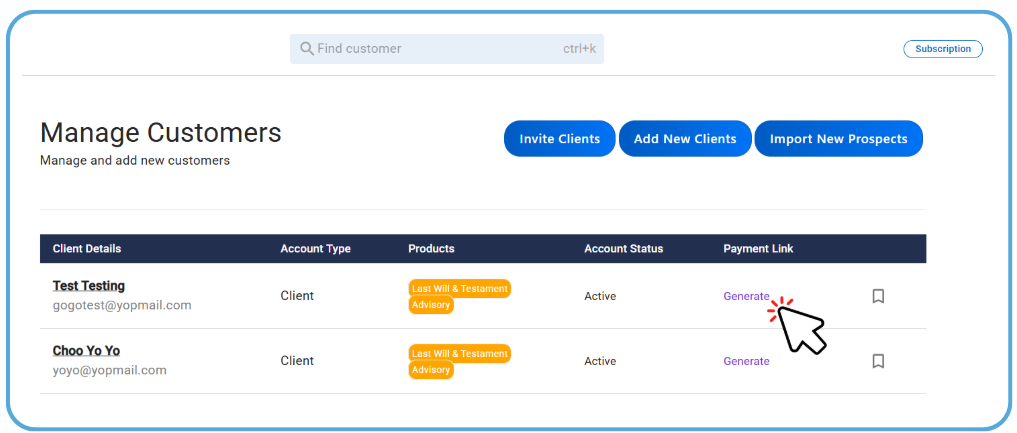
Option A: Via Manage Customers Page
Navigate to the Manage Customers page from your dashboard. Locate the specific client in your list. Under the Payment Link column, click the Generate button.
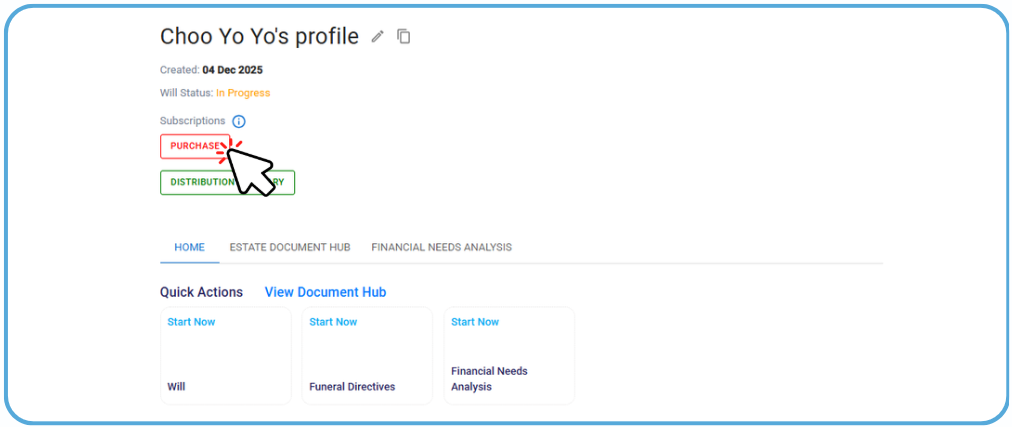
Option B: Via Client Profile
Open the specific Client Profile. Scroll down to the Subscriptions section. Click the red Purchase button.
- Once the interface opens, follow these steps to set up the request:
-
Select Product: Choose either Comprehensive Will or Corporate Trustee Services.
-
Choose Payment Method:
-
Token Redemption: Select this if you wish to redeem available tokens for a free will.
-
Payment by Client: Select this if the client is paying for the service directly.
-
-
Advisory Fee (Optional): If you are using token redemption, and wish to charge for your consultation services, you may opt to collect an Advisory Fee here.
-
If you have selected Payment by Client, review the details and click Proceed.
-
The system will generate a unique Payment Link.
-
Copy and Send: Share this link with your client via your preferred communication channel.
-
Once the client receives the link, they will be able to view the payment gateway where they can select their preferred payment method (Credit/Debit Card, FPX, GrabPay, GooglePay)
-
Confirmation: Once payment is successful, the service will be activated for the client's account.
Note: If you used Token Redemption, no payment link is required; the service will be unlocked immediately upon confirmation.