When to use this feature
Use the Clone feature when creating a Will for a spouse or family member who shares similar assets. This creates a new client profile that duplicates the asset list from the original client, saving you from re-typing data.
Instructions:
-
Open the existing client's profile (e.g. the Husband).
-
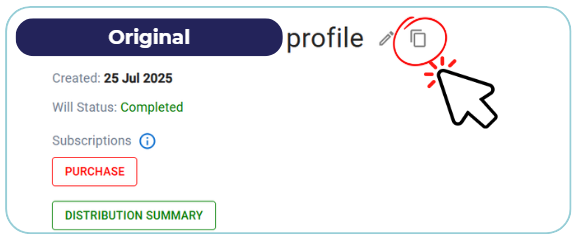
Click on the Clone icon (Located next to the Client Name Profile Header).
-
Click "Continue" to confirm that you want to clone this client.
-
A pop-up form will appear. Enter the New Client's personal details. Click "Clone".
-
The system does not automatically switch you to the new profile. Exit the current (original) profile and return to your customer dashboard. Find and Open the newly created profile from your customer list.
-
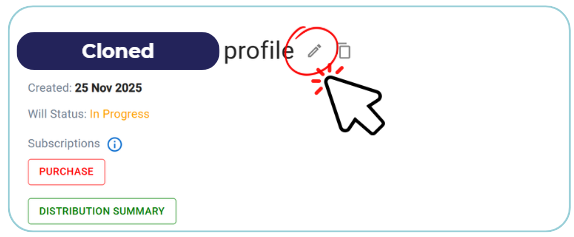
Before proceeding with the Will, you must obtain the new client's consent. Click on the Pencil icon next to your client's name
-
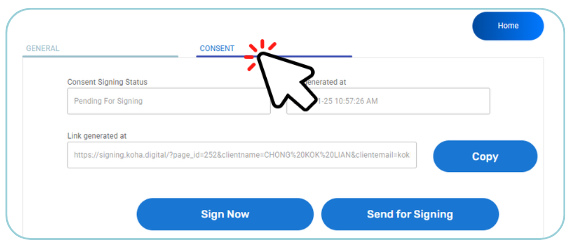
Go to the Consent tab to get their signature.
-
The cloned profile comes with assets pre-filled(mirrored) from the original profile.
-
Review the list and update any differences (e.g., remove assets that are individually owned by the first spouse, or add new ones specific to this client).
-
The cloned profile acts as a completely standalone client file. Any changes made here will not affect the original profile. You can now proceed to complete the remaining sections of the Will.